Resources
What is BaaS?
- "Backend as a Service" (BaaS) is a cloud computing model that provides ready-to-use backend infrastructure.
- With BaaS, developers can focus more on front-end development, since core backend functionality like databases and authentication comes prebuilt.
What is Firebase?
- Firebase is a BaaS platform developed by Google.
- It's known for its scalability and ease of integration across different frameworks.
- Firebase offers various SDKs and tools, including a powerful real-time NoSQL database.
- This tutorial focuses specifically on Firebase's Realtime Database.
How the Realtime Database works
- Firebase Realtime Database is a cloud-based NoSQL database that syncs data in real time across every connected client.
- Changes made by one client are instantly reflected on others, using WebSockets — a persistent, two-way communication channel between client and server.
- Being NoSQL, it stores data in a schema-less, JSON-based format, which stays flexible across data types and use cases.
Firebase Realtime Database vs. PostgreSQL
| Feature | Firebase Realtime Database | PostgreSQL |
|---|---|---|
| Type | NoSQL (JSON-based, hierarchical) | SQL (relational) |
| Structure | Schema-less; data stored as JSON | Structured; tables, rows, and relationships |
| Querying | Limited; hierarchical traversal | Full SQL querying, joins, and aggregations |
| Scalability | Built for real-time sync on mobile/web apps | Scales for complex queries and enterprise workloads |
| Transactions | Basic, with limited capabilities | ACID-compliant, for complex operations |
| Data consistency | Event-driven; eventual consistency | Strong consistency with transactional integrity |
| Offline support | Built-in offline mode for mobile apps | Needs additional configuration |
| Security | Rules-based, with Firebase Authentication | Fine-grained roles, permissions, and encryption |
| Use cases | Real-time chat, live updates, IoT | Enterprise apps, financial systems, analytics |
Table generated by Microsoft Copilot.
A couple of terms
- JSON is a plain-text, human- and machine-readable format used for data interchange.
- Hierarchical databases are tree-like structures commonly used in web apps.
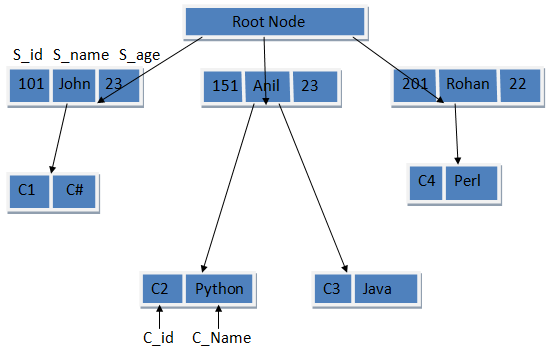
Where Firebase fits
Since it's built around a real-time database, Firebase is a strong fit for:
- Chat apps
- Collaborative tools, like Replit
- Live dashboards, like trading views
- Social apps with a lot of unstructured data, where a NoSQL model helps
Getting started with Firebase
All you need to begin is a Firebase app with a Realtime Database attached.
- Go to firebase.google.com
- Click "Get started in console"
- Create an app and follow the prompts
- Under "Build" in the sidebar, choose Realtime Database and create one (use Test Mode for tutorials)
Connecting from your terminal
- Install the Firebase Admin SDK:
pip install firebase_admin - Create a project directory and a Python file (e.g.
main.py) - Copy the template below and swap in your own credentials:
import firebase_admin

cred_obj = firebase_admin.credentials.Certificate('....path to file')
default_app = firebase_admin.initialize_app(cred_obj, {
    'databaseURL': databaseURL
})

from firebase_admin import db
ref = db.reference("/")

import json
with open("objects.json", "r") as f:
    file_contents = json.load(f)
ref.set(file_contents)
Adding objects to the database
- In the code above,
objects.jsonis opened and its contents sent to Firebase withref.set(). - Create a JSON file named
objects.jsonwith data shaped like this:
{
    "Object": {
        "Attribute1": "Beep",
        "Attribute2": "Boop"
    }
}
Run the Python script, and the objects should appear in your Firebase Realtime Database console.